
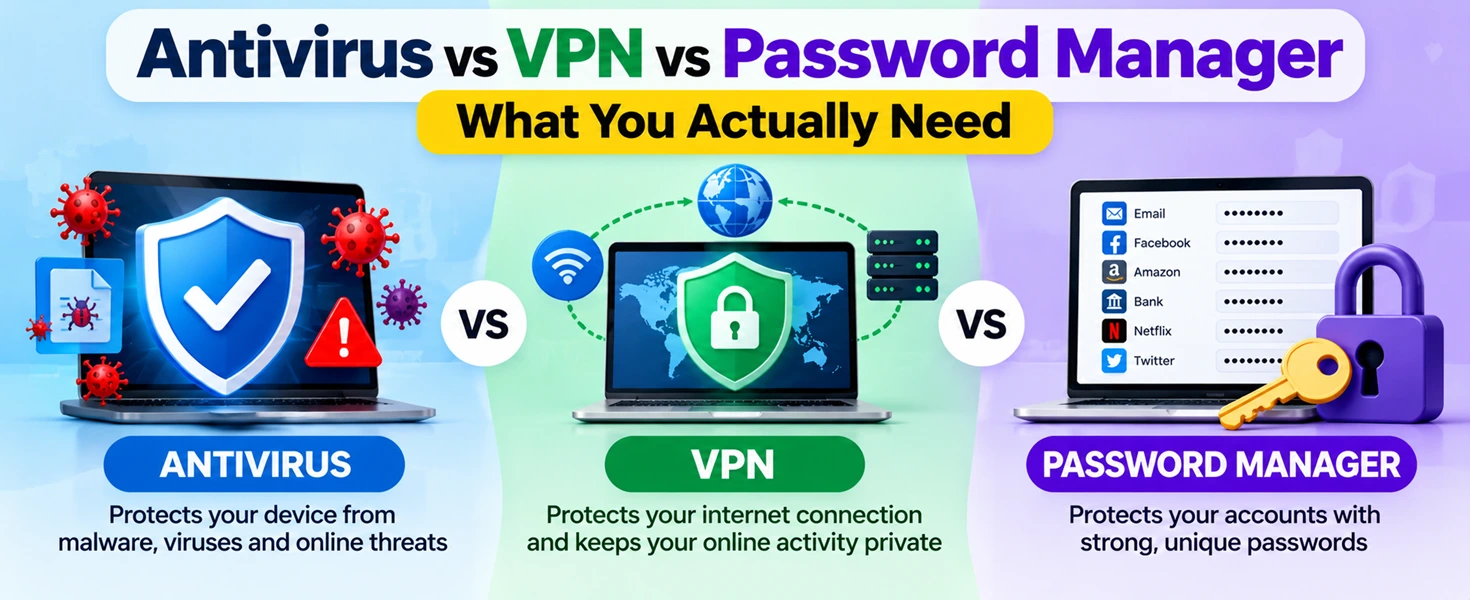
Security software ads make it sound like you need everything at once, an antivirus suite, a VPN, and a password manager, all bundled together. But these three tools do very different jobs, and not everyone needs all three at full price. This guide breaks down what each one actually protects you from, so you can decide what's worth paying for.
What Does Antivirus Actually Protect You From?
Antivirus software scans your device for malware, viruses, ransomware, and other malicious programs. It works by watching files, downloads, and running programs, then blocking or removing anything it recognizes as harmful. Modern antivirus tools also flag phishing websites and suspicious email attachments before you open them.
Think of it as protection for what's already on or arriving at your device. If someone tricks you into downloading an infected file, antivirus is your first line of defense against it doing damage.
What Does a VPN Actually Protect You From?
A VPN, or virtual private network, encrypts your internet traffic and hides your IP address. It protects the connection between your device and the internet, not the device itself. This matters most on public Wi-Fi, where anyone on the same network could potentially intercept your data.
A VPN does not stop malware, does not block phishing sites on its own, and does not protect your passwords. It's about privacy and safe connections, not device security. If you mostly browse from home on a trusted network, a VPN matters far less than if you regularly work from cafes, airports, or hotels.
What Does a Password Manager Actually Protect You From?
A password manager stores and generates strong, unique passwords for every account you have, so a breach on one site doesn't compromise all your accounts. Most people reuse passwords across multiple sites, which means a single leaked password can unlock your email, banking, and social accounts all at once.
A password manager solves this by remembering complex, unique passwords for you and auto-filling them, so there's no incentive to reuse anything. Many also alert you if a password appears in a known data breach.
Antivirus vs VPN vs Password Manager: Side-by-Side Comparison
Do I Need a VPN and Antivirus Together?
This is one of the most common questions, and the honest answer is: it depends on your habits, not on marketing. You benefit from having both if you regularly connect to public Wi-Fi and also download files, click links, or install apps. If you mostly work from a secured home network and are careful about downloads, antivirus does most of the heavy lifting, and a VPN becomes a nice-to-have rather than essential.
They don't overlap much, since one protects your device and the other protects your connection, so running both isn't wasteful if you actually need what each offers.
Difference Between Antivirus and VPN in Plain Terms
The simplest way to remember it: antivirus stops bad things from running on your computer. A VPN stops other people from seeing what you're doing online. One is defense, the other is privacy. Confusing the two is common because many security brands bundle both into one subscription, which makes them feel like the same category of protection.
So, What Do You Actually Need?
For most home users, here's a realistic priority order:
Antivirus — Nearly everyone benefits from this, especially Windows users. Built-in protection like Microsoft Defender or macOS's XProtect covers basic needs; a paid suite adds stronger phishing and ransomware protection.
Password manager — Just as essential as antivirus, arguably more so, since reused passwords are one of the most common ways accounts get compromised.
VPN — Situational. Worth it if you travel, use public Wi-Fi often, or want to limit tracking. Less critical if you mostly browse from a trusted home network.
If budget is tight, prioritize antivirus and a password manager first. Add a VPN once you have a specific reason to need one, not because a bundle deal made it feel free.
Conclusion
None of these three tools replace the others. Antivirus guards your device, a VPN guards your connection, and a password manager guards your accounts. The right setup depends on how you actually use your devices, not on which bundle looks like the best deal.
Frequently Asked Questions
Do I need a VPN and antivirus at the same time?
Only if your habits call for both, frequent public Wi-Fi use plus regular downloads or browsing. Otherwise, antivirus alone covers most everyday risk.
What is the difference between antivirus and VPN?
Antivirus protects your device from malicious software. A VPN protects your internet connection from being intercepted or tracked. They solve different problems.
Can a password manager replace antivirus?
No. A password manager only protects your login credentials. It does nothing to stop malware or viruses, so it isn't a substitute for antivirus.
Is a VPN necessary for home use?
Not usually, if your home network is secure and password-protected. VPNs matter most on public or shared networks.
Should I buy a security bundle with all three?
Only if you'll actually use all three regularly. Bundles can save money, but paying for a VPN you rarely turn on isn't a real saving.
Which one should I get first if I can only afford one?
A password manager, followed closely by antivirus. Weak, reused passwords are one of the most common ways accounts get breached, and it's often the easiest gap to fix immediately.




Hi Dear, I'm Meenu, and I've written the posts on this blog. I've tried my best to pack them with helpful info to tackle any questions you might have. I hope you find what you're looking for here. Thanks for sticking around till the end!