

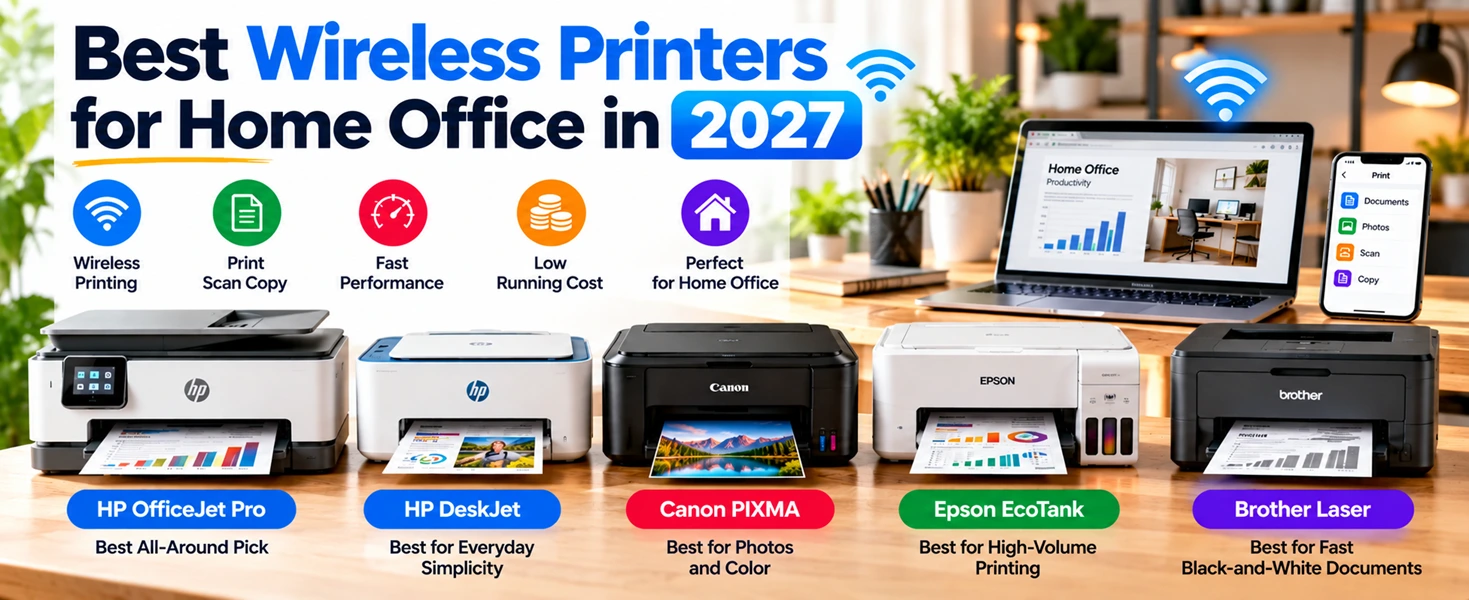
If you're setting up or upgrading your home workspace, a good printer is easy to overlook until it lets you down. A slow, cable-tangled printer for home use can turn a five-minute task into a frustrating chore. This guide breaks down the best wireless printers for a home office in 2026, so you can pick one that actually fits how you work.
What Makes a Printer Good for Home Office Use?
Not every printer built for offices suits a home setup, and not every home printer can handle daily work documents. A good printer for home use in 2027 usually gets a few things right: reliable Wi-Fi that doesn't drop mid-print, decent speed for everyday documents, low running costs, and a compact size that doesn't dominate your desk. If you also scan contracts or print the occasional photo, look for an all-in-one model rather than a print-only device.
Why Do Wireless Printers Matter More Now?
Most home offices don't have a dedicated printer table anymore. Desks are smaller, and people move printers between rooms or share them across a household. Wireless printers solve this by letting you print from a laptop, phone, or tablet without a cable in sight. Many current models also connect to mobile apps, so you can print or scan a document while sitting on the couch, not just from your desk.
Best Printer for Home Use: Our Top Picks for 2027
Here's how the standout models break down by what they're best at.
Best All-Around Pick: HP OfficeJet Pro Series
HP's OfficeJet Pro line remains a strong all-around choice for home offices. It handles everyday printing, scanning, and copying at a reasonable speed, and connects easily through the HP Smart app. If you print a mix of documents and occasional color materials, this is a safe, dependable option.
Best for Everyday Simplicity: HP DeskJet Series
If your needs are basic, mostly documents, forms, and the occasional school project, the DeskJet series keeps things simple. It's compact, connects over Wi-Fi without much setup hassle, and includes AI-based print cleanup for web pages and emails, so text-heavy pages print cleaner without extra editing.
Best for Photos and Color: Canon PIXMA Series
Canon's PIXMA lineup consistently stands out for color accuracy, which matters if you print photos, presentations, or design work at home. It's also compact enough for a small desk and pairs well with mobile printing apps.
Best for High-Volume Printing: Canon MegaTank or Epson EcoTank
If you print often, refillable ink tank printers are worth the higher upfront cost. Instead of replacing cartridges every few weeks, you refill a tank that can last months, which lowers your cost per page significantly over time.
Best for Fast Black-and-White Documents: Brother Laser Printers
For home offices that print mostly text, contracts, invoices, or reports, a Brother laser printer is hard to beat. Laser models print black-and-white pages quickly and handle higher monthly volumes without the ink upkeep of inkjets.
How to Choose the Right Wireless Printer for Your Home Office?
Think through these four questions before buying:
What do you print most? Mostly text favors laser printers. Photos and color favor inkjet.
How much do you print monthly? High volume makes tank printers cheaper long-term.
Do you need scanning or copying? If yes, get an all-in-one, not a print-only model.
How reliable is your home Wi-Fi? Look for dual-band (2.4GHz and 5GHz) support if your network is congested, since some budget printers only support 2.4GHz.
How Much Should You Budget?
Entry-level wireless printers for home use typically start around $70 to $100. Mid-range all-in-ones with better speed and app features run $150 to $250. Tank-based printers cost more upfront, often $300 or higher, but save money over a year or two if you print regularly. Factor in ink or toner costs, not just the printer price, since that's where the real long-term cost sits.
Conclusion
The best printer for home use isn't the most expensive one. It's the one that matches how much you actually print and what you print most. Match your choice to your habits, not just brand reputation, and you'll get a printer that works quietly in the background instead of becoming another thing to troubleshoot.
Frequently Asked Questions
What is the best wireless printer for home office use in 2027?
It depends on your needs. HP OfficeJet Pro suits general use, Canon PIXMA suits color and photo printing, and Brother laser printers suit high-volume text documents.
Is an inkjet or laser printer better for home use?
Inkjets handle color and photos better. Lasers print black-and-white text faster and more cheaply per page, which suits document-heavy home offices.
Do wireless printers need Wi-Fi to work?
Most need Wi-Fi for wireless printing, but many also support direct printing from a phone or USB connection as a backup.
Are ink tank printers worth it for home use?
Yes, if you print frequently. The higher upfront cost pays off through much cheaper ink refills over time.
Can I print from my phone with these printers?
Yes. Nearly all current wireless printers support mobile apps like HP Smart, Canon PRINT, or Brother iPrint&Scan for printing and scanning from a phone or tablet.
How do I fix a wireless printer that keeps disconnecting?
Restart your router and printer, keep the printer close to your router, and check for a firmware update through the manufacturer's app. Frequent disconnects are often a Wi-Fi range or interference issue rather than a printer fault.





Hi Dear, I'm Meenu, and I've written the posts on this blog. I've tried my best to pack them with helpful info to tackle any questions you might have. I hope you find what you're looking for here. Thanks for sticking around till the end!