

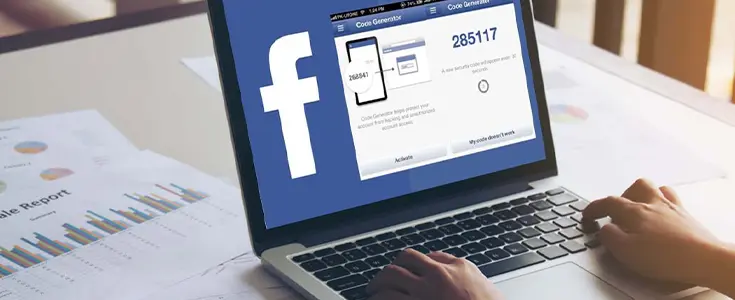
Online security has become
increasingly necessary in our modern era. Cyber criminals and hackers are
consistently coming up with new methods to penetrate an account. Facebook has
developed various security measures that help secure its users. One of the best
security measures that has been provided by Facebook is the Facebook Code
Generator. This blog provides information on what the Facebook code generator
is, how it works, and where it can be found on Facebook.
What is the Facebook Code Generator?
Facebook Code Generator is
one of the best security measures that has been incorporated within Facebook's
mobile application. It acts as the second factor in the process of two-factor
authentication. A code will be generated every time you use an unfamiliar
device when logging in. The code consists of six digits that must be entered
before your login will be confirmed.
Where is the Code Generator on Facebook?
The Code Generator on Facebook
is one of the most frequently asked questions in the list. This is really a
simple one. The Code Generator on Facebook can be found under the Security tab
of the mobile application of Facebook. It cannot be accessed through the
website version of Facebook.
How to Find the Facebook Code Generator on Android
Follow these steps to locate
and use the Facebook Code Generator on an Android phone.
Log in to Facebook using your
Android smartphone.
·
Click on the
three dots located at the bottom right corner of your phone screen.
·
Navigate to
Settings & Privacy.
·
Tap on Password
and Security.
·
Navigate to the Code
Generator tab and click on it.
·
The six-digit
code generator number will appear on your screen instantly.
This code is only valid for 30
seconds. Enter it quickly when prompted during login.
Where is the Code Generator on Facebook for iPhone?
iPhone users are always looking
for the code generator on Facebook for their devices. Steps are almost the same
as the previous one. Access the Facebook application on your iPhone. Click on
the three-lined menu button. Then click on Settings & Privacy, and after
that on Settings. Choose the option 'Password and Security'. Locate the option
'Code Generator'. There, you will see
your six-digit authentication code. Use it in the next 30 seconds.
How Does the Facebook Code Generator Work?
The two-step verification
or two-factor authentication process uses the Facebook code generator. If you
have activated two-factor authentication, Facebook will link your account to
your phone. With each login from a different browser or device, Facebook sends
you a temporary password that is changed every 30 seconds. You will be prompted
to enter the code at each login. Without the code, no one could access your
account, despite having your password.
Why Do You Need the Facebook Authentication Code Generator?
With digital threats increasing
by the day, there is a need for a double-layered security measure. With just a
password, your account may not be safe anymore. By using the Facebook code
generator for authentication, no one could hack into your account. Here are
some reasons why you should use it.
•
It blocks hackers
even if they know your password.
•
It alerts you
when someone tries to log in from a new device.
•
It works offline
without needing a Wi-Fi or data connection.
•
It generates a
fresh code every 30 seconds for maximum security.
•
It protects your
personal photos, messages, and account data.
How to Set Up Two-Factor Authentication on Facebook
Before the activation of the
Code Generator, you will have to enable two-factor authentication. Below are
the steps to activate this security method in your Facebook account.
•
Launch the
Facebook application and navigate to Settings and Privacy.
•
Tap on Settings
and then select Password and Security.
•
Click on the Two
Factor Authentication option available.
•
From there,
choose the security mode you prefer, including an authenticator application and
SMS.
•
Follow the
on-screen instructions to activate the two-factor authentication.
•
The moment it is
activated, the Code Generator becomes available in your app.
What Are Facebook Login Recovery Codes?
Facebook has the feature of
providing its users with recovery codes that serve as additional logins. This
is especially handy when your mobile device does not work for some reason. Up
to 10 codes can be created via the Facebook app itself. Navigate to the
Password and Security tab, click Recovery Codes, and generate codes. Make sure
to store them safely because they can be used only once.
What to Do If Your Facebook Code Generator is Not Working
Sometimes, however, there are
problems with the Facebook Code Generator. In this case, try out these fast
fixes.
·
Ensure that the
date and time on your phone are correct.
·
Reset the
Facebook app and generate a new code.
·
Touch the button
labeled My Code does not work.
·
Use one of the
recovery codes and log in using it.
·
Try to turn on
two-factor authentication again via the app.
Can You Use a Facebook Code Generator Without Internet?
Yes, one major advantage of the
Facebook Code Generator is offline functionality. The code is generated
according to the time and a secret key that is stored on your device. As a
result, you do not have to connect to the Internet or have a cell signal in
order to receive your code. Thus, the generator is much better than
SMS-verification codes because it will work no matter where you are, on either
an iPhone or an Android phone.
Conclusion
The Facebook Code Generator is
a powerful and easy-to-use security tool. Two-factor authentication is great
for protecting your Facebook account from intruders and spammers, but the
Facebook Code Generator is a very simple yet extremely effective security
method that will make your account much safer. As you've just learned how to
find the code generator on Facebook, it would be wise to start using it now.



Hi Dear, I'm Meenu, and I've written the posts on this blog. I've tried my best to pack them with helpful info to tackle any questions you might have. I hope you find what you're looking for here. Thanks for sticking around till the end!